
Accessing a workshop or course.
Your original course purchase automatically created an account for you in the learning platform. Below we’ve outlined how to access your courses depending on whether you are a member or not.
If you are a BCACC Member
Step 1: Are you logged in, on this site?
Look at the top right corner of this page to check if you are logged in.
If you see your name or profile picture, you are logged in and ready to access your course.
If you are logged in:
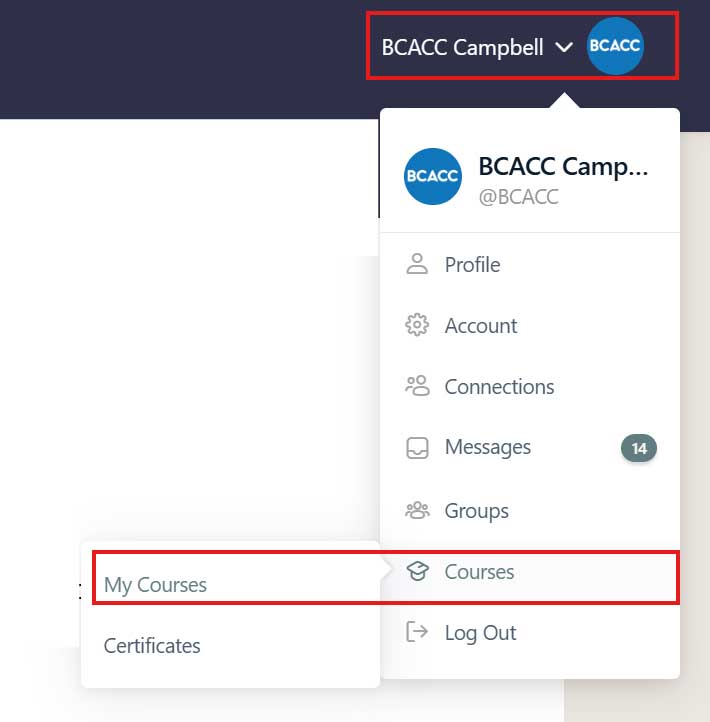
Click your profile image or name to navigate to your courses:
Not logged in:
Go to the BCACC member portal to get automatically signed into this learning site with your profile. This will ensure that you gain access to all of your courses.
Once you are in the member portal, click on the navigation item labelled eConnect – and following instructions to get automatically logged back into this site.
If you are NOT a meber
Step 1: Are you logged into this site?
Look at the top right corner of this page.
If you see your name or profile picture, you are logged in and ready to access your course.
If you are logged in:
Click on your profile image or name, to navigate to your courses:
Not logged in?
You received a welcome email from this site when you registered for the course.
This email included a link to create your password for your profile. Follow the link, set your secure password, and log in with the email address you used for registration. If you can’t find your activation or setup email, please check your spam/junk folder.
This will ensure that you gain access to all of your courses.